Tabby Cats Procreate Pattern Brush: Streamlining Seamless Design Creation
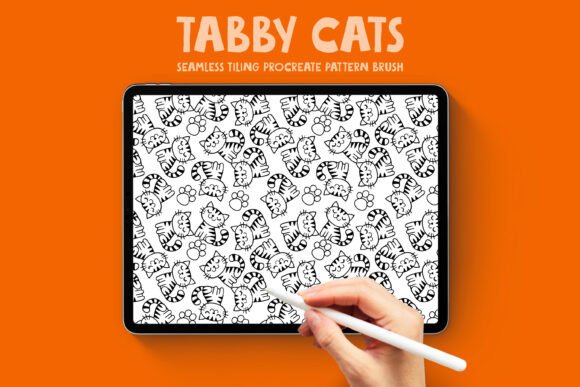
Creating intricate, seamless patterns in digital illustration often involves a complex workflow of setting up grids, managing layers, and meticulously aligning edges to ensure perfect tiling. For artists and designers working on tight deadlines or seeking instant inspiration, this technical overhead can stifle creativity. The Tabby Cats Procreate Pattern Brush offers a practical solution to this common friction point by transforming the pattern-making process into a simple, fluid gesture. This specialized tool allows users to paint a continuous, repeating motif of adorable tabby cats directly onto their canvas, eliminating the need for manual alignment while maintaining professional-grade seamlessness.
Designed specifically for the iPad and Apple Pencil ecosystem, this brush addresses the specific needs of surface pattern designers, coloring book creators, and print-on-demand sellers who require high-contrast, clean line art. By integrating the tiling logic directly into the brush engine, it enables rapid prototyping and production-ready artwork generation that would traditionally take hours to achieve manually.
Solving the Seamless Alignment Challenge
One of the most persistent challenges in digital surface design is achieving true seamlessness without visible artifacts or misaligned motifs at the tile boundaries. When creating patterns manually, artists must constantly zoom out to check repetition, adjust layer positions, and fix edge discrepancies. This iterative checking process breaks the creative flow and consumes valuable production time.
The Tabby Cats Procreate Pattern Brush resolves this issue through pre-programmed tiling parameters. Because the brush creates a seamless repeating pattern natively as you draw, you can fill large areas with confidence, knowing that the design will tile perfectly across any dimension. This is particularly beneficial for designers who experience "blank canvas paralysis" or those who need to generate background textures quickly for composite projects. Instead of building a pattern from scratch, the brush serves as both a creation tool and an instant source of inspiration, allowing you to focus on composition and color rather than technical grid management.
Ideal Applications for High-Contrast Line Art
A defining characteristic of this brush is its output style: clean, bold black line art with absolutely no gray tones, shading, or gradients. While many digital brushes offer textured or painterly effects, the absence of mid-tones makes the Tabby Cats Procreate Pattern Brush uniquely suited for specific commercial and creative applications where clarity is paramount.
Coloring Books and Activity Pages
For creators in the low-content publishing niche, such as Amazon KDP coloring books, line quality is non-negotiable. Grayscale shading often prints poorly or confuses colorists who prefer to add their own shading techniques. This brush provides crisp, vector-style lines that reproduce beautifully in print. Users can instantly generate unique coloring pages by varying stroke direction, scale, and density, ensuring that no two pages look identical despite using the same asset base.
Print-on-Demand and Merchandise
Sellers on platforms like Redbubble, Etsy, or Society6 require versatile assets that translate well across different products. The high-contrast nature of these tabby cat illustrations ensures visibility on dark fabrics for apparel and maintains definition on small items like phone cases or mugs. Because the pattern is seamless, it can be applied to products of varying dimensions without awkward cropping or visible repeat lines, which is a frequent cause of customer returns or negative reviews in the POD space.
Digital Scrapbooking and Social Media
Digital planners and scrapbookers often seek cohesive background papers that do not distract from photos or journaling entries. The monochromatic, bold aesthetic of this brush allows for easy recoloring within Procreate. Users can apply a gradient map or use the hue/saturation adjustment to match the pattern to any seasonal theme or brand palette instantly, making it a versatile asset for social media graphics and digital stationery.
Adapting the Workflow for Different User Goals
While the tool functions identically for every user, successful implementation depends on understanding your specific end goal. Different creators should approach the Tabby Cats Procreate Pattern Brush with distinct strategies to maximize utility.
- For Speed-Focused Content Creators: If your primary goal is volume, such as producing daily social media posts or filling a 100-page coloring book, utilize the brush at its default settings to rapidly block out backgrounds. Focus on varying the layout by rotating the canvas between strokes to create organic, non-linear pattern flows that appear hand-drawn rather than stamped.
- For Product Designers: Approach the brush as a base layer. Paint the pattern, then lock the layer and experiment with blend modes or clipping masks to integrate texture or color gradients. This preserves the structural integrity of the seamless line work while adding the depth required for premium merchandise.
- For Traditional Artists Transitioning to Digital: Use the brush to bridge the gap between analog and digital workflows. The familiar motion of drawing with a stylus combined with the automatic technical perfection helps reduce the learning curve associated with digital pattern making. Treat the brush output as a sketch layer, refining individual cats or adding hand-drawn elements on top to personalize the AI-assisted base.
Understanding the Creation Process and Asset Quality
Transparency regarding digital asset origins is increasingly important for professional designers. It is essential to note that the original artwork for this Tabby Cats Procreate Pattern Brush was created with AI assistance and subsequently refined in Photoshop. This hybrid workflow combines the generative speed of artificial intelligence with the precision of human editing.
The refinement stage is critical for usability. Raw AI outputs often contain broken lines, inconsistent stroke weights, or non-seamless edges that render them useless for professional tiling. The post-processing involved in creating this brush ensures that all lines are closed paths suitable for coloring, contrast levels are standardized for print, and the repeat logic is mathematically sound. When incorporating this brush into commercial work, users benefit from this curated quality, receiving a polished design tool rather than a raw generation. However, designers should always review licensing terms and consider adding significant transformative value when using AI-assisted bases for trademarked or exclusive commercial products.
Practical Considerations for Implementation
To get the most out of the Tabby Cats Procreate Pattern Brush, keep a few technical considerations in mind during your workflow. First, always test your brush size relative to your canvas resolution before committing to a full design. Because the pattern is seamless, scaling it up after painting may result in pixelation if the initial resolution was too low. Working at 300 DPI or higher is recommended for any print-intended project.
Additionally, while the brush creates a continuous pattern, varying your pressure and stroke speed can introduce natural imperfections that enhance the hand-drawn aesthetic. Uniform, mechanical strokes can sometimes reveal the digital nature of the tool; introducing human variance in application helps maintain the organic charm of the tabby cat motif. Finally, organize your layers effectively. Keep your pattern fills on separate layers from foreground elements to allow for non-destructive editing, enabling you to swap patterns or adjust opacity without redrawing your entire composition.
By leveraging the specific strengths of the Tabby Cats Procreate Pattern Brush—its seamless tiling capability, high-contrast line work, and refined execution—designers can significantly reduce production time while expanding their creative possibilities. Whether filling a coloring book page or designing a best-selling textile print, this tool transforms a complex technical task into an intuitive, enjoyable part of the artistic process.