Speckle Noise SVG Brushes: Evaluating Vector Texture Assets for Professional Design
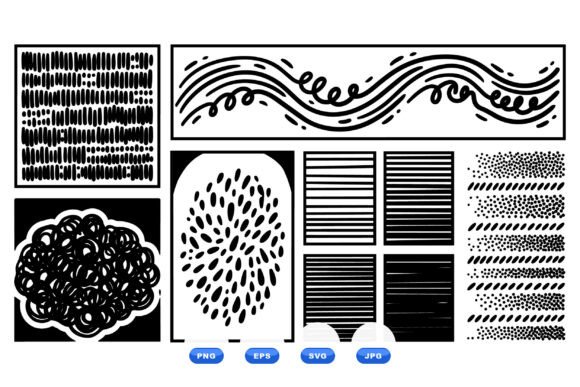
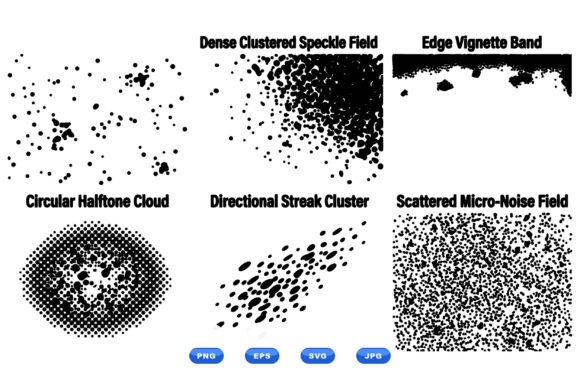
Achieving authentic analog texture within a digital workflow remains one of the most persistent challenges for graphic designers and content creators. While raster brushes have long been the standard for adding grain and noise, they often introduce resolution limitations that complicate print production and large-format scaling. The Speckle Noise SVG Brushes collection addresses this specific friction point by providing halftone grunge textures in a fully vector format. This asset pack distinguishes itself through technical versatility rather than sheer volume, offering six distinct speckle variations including circular cloud, dense cluster, directional streak, and edge vignette patterns. For professionals evaluating whether to integrate vector-based texturing into their toolkit, understanding the practical application and file integrity of these assets is essential before purchase.
Technical Composition and File Integrity
The primary value proposition of this collection lies in its format diversity and scalability. Unlike traditional Photoshop or Procreate brushes that rely on pixel data, these assets are constructed as mathematical paths. The instant download ZIP archive contains SVG, EPS, PNG, and JPG files, ensuring compatibility across virtually every major design platform. The inclusion of both SVG and EPS formats is particularly significant for professional workflows. SVG files offer lightweight, code-editable vectors ideal for web design and UI prototyping, while EPS files maintain broader compatibility with legacy print systems and older versions of Adobe Illustrator.
For users who require immediate drag-and-drop functionality without vector editing, the transparent PNG and high-resolution JPG alternatives serve as reliable fallbacks. However, the core advantage remains the vector architecture. Because these speckle noise elements are not rasterized, they can be scaled from business card size to billboard dimensions without any loss of fidelity or introduction of pixelation artifacts. This makes the collection inherently future-proof for designers who frequently repurpose assets across different media specifications. The clean black and white color space further enhances utility, allowing for instant recoloring via fill attributes or blend modes without the need for complex masking or hue adjustments.
Analyzing the Six Core Texture Variations
Rather than offering hundreds of redundant variations, this collection focuses on six functional archetypes that cover the majority of texturing use cases. Understanding the specific purpose of each variation helps determine if the set aligns with current project needs:
- Circular Cloud: This pattern mimics organic, isotropic noise distribution. It is most effective for softening flat digital gradients, adding subtle paper-like tooth to backgrounds, or breaking up solid color blocks in minimalist layouts. The randomness prevents the repetitive tiling look common in lower-quality digital textures.
- Dense Cluster: Characterized by tighter particle grouping, this variation provides heavier visual weight. It functions well as a focal point anchor or for creating depth in layered compositions. In print design, the density holds up well during offset reproduction where fine details might otherwise be lost.
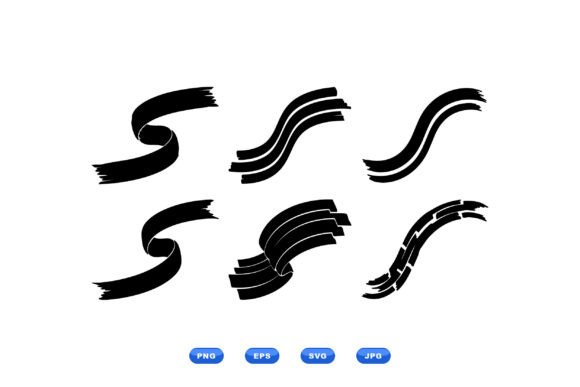
- Directional Streak: Unlike static noise, this texture introduces kinetic energy. It is practically useful for implying motion, speed, or transition in social media banners and dynamic typography. The linear quality also serves as an alternative to standard motion blur effects, maintaining crisp edges at any zoom level.
- Edge Vignette: Pre-composed framing elements save significant layout time. These vectors allow designers to draw focus to center-stage content without manually painting burn effects. They are particularly valuable for thumbnail creation, certificate design, and vintage-style packaging where consistent border treatment is required.
- Halftone Grunge: Bridging the gap between structured screening and chaotic decay, this texture evokes retro print aesthetics. It performs reliably in editorial design and zine production, providing authentic period styling without the moiré patterns that can occur when scanning physical halftones.
- Speckle Overlay: A general-purpose utility texture designed for global application. This serves as the workhorse of the collection, suitable for unifying disparate design elements or adding tactile quality to sterile digital interfaces.
Practical Performance in Digital and Print Workflows
In real-world application, the performance of Speckle Noise SVG Brushes depends heavily on the intended output medium. For digital projects, including social media graphics and web banners, the vector format ensures sharpness on high-DPI retina displays. Social media platforms often compress uploaded images aggressively; starting with a high-contrast vector source helps preserve texture definition even after platform-side compression algorithms are applied. The transparent background support eliminates the tedious step of removing white backgrounds, streamlining the compositing process for marketers and content creators working under tight deadlines.
Print applications present different considerations. Vector textures theoretically offer infinite resolution, but physical printing has mechanical limits. When using the dense cluster or halftone variations for offset or screen printing, designers must verify that individual speckle sizes exceed the minimum dot gain threshold of their chosen press. Extremely fine vector nodes may fill in during production, altering the intended aesthetic. Fortunately, because these are true vectors, adjusting the scale or stroke weight to accommodate print specifications is a non-destructive operation. This editability provides a safety margin that raster brush packs simply cannot offer.
Color management represents another practical strength. The strict black-and-white foundation means these textures interact predictably with blend modes. Using Multiply, Overlay, or Soft Light allows the speckle patterns to inherit underlying colors seamlessly. For brands requiring specific Pantone matching, the vector paths can be directly assigned spot colors, making this collection viable for packaging and branded merchandise where color accuracy is non-negotiable.
Evaluating Usability and Learning Curve
While vector textures offer superior technical benefits, they do require a slightly different mindset than raster brushing. Users accustomed to pressure-sensitive tablet input may initially find the static nature of pre-made vector shapes limiting. These assets function more like stamps or modular building blocks than traditional paint brushes. Success requires thinking in terms of composition and layering rather than gestural application.
However, this constraint often leads to cleaner, more intentional design outcomes. The inability to "over-paint" encourages deliberate placement and scaling decisions. For designers transitioning from raster-heavy workflows, this collection serves as an accessible entry point to vector texturing. The organized file structure and clear naming conventions reduce cognitive load, allowing users to locate specific texture types quickly. The learning investment is minimal, especially for those already proficient in Illustrator, Affinity Designer, or Figma.
Audience Fit and Strategic Value Assessment
Determining whether Speckle Noise SVG Brushes warrants a place in your asset library requires honest assessment of your typical project parameters. This collection delivers maximum return for professionals who regularly cross between digital and print mediums. Freelancers and agency designers managing brand identities will appreciate the consistency achievable through reusable vector elements. Educators and publishers producing course materials or textbooks benefit from the crisp reproduction at various sizes. Small business owners creating their own marketing collateral gain access to professional-grade texturing without needing advanced illustration skills.
Conversely, certain users may find limited value. Digital painters seeking expressive, hand-drawn texture for concept art or illustration may prefer the organic variability of raster brushes. Those working exclusively in video or 3D environments might require sequence-based or volumetric noise solutions rather than static 2D vectors. Additionally, designers who exclusively work at fixed, low resolutions for web-only deliverables may not justify the vector premium when high-res PNGs would suffice.
From a long-term value perspective, vector assets typically outlast trend cycles. While specific grunge styles may evolve, fundamental noise patterns remain perpetually useful. The ability to modify, combine, and repurpose these six core textures extends their functional lifespan far beyond that of trendy, single-use brush packs. For professionals prioritizing sustainable, adaptable toolkits over disposable novelty, this collection represents a pragmatic investment. The combination of format flexibility, thoughtful curation, and production-ready quality positions it as a reliable utility resource rather than a mere creative toy.
Ultimately, the decision hinges on workflow requirements. If your projects demand scalable, editable, and cross-platform compatible texture solutions, Speckle Noise SVG Brushes addresses genuine production pain points. The collection succeeds not by overwhelming with quantity, but by solving specific technical problems with appropriate tools. For designers tired of compromising texture quality when scaling or switching mediums, this vector-based approach offers a durable, professional solution worth integrating into daily practice.