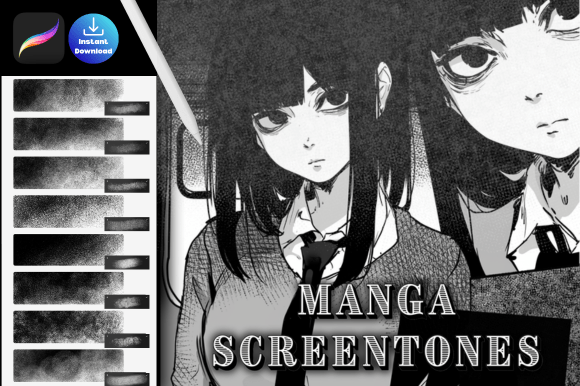
Procreate Manga Screentone Brush: Achieving the Classic Print Aesthetic Digitally
The distinct visual language of manga relies heavily on texture, contrast, and rhythm. For decades, this aesthetic was defined by physical screentone sheets—adhesive films with pre-printed dot patterns that artists meticulously cut and applied to ink drawings. Today, as illustration workflows migrate almost entirely to tablets, replicating that tactile, printed quality has become a primary focus for digital creators. The Procreate Manga Screentone Brush serves as the critical bridge between traditional print history and modern digital efficiency, allowing artists to generate authentic halftone and dot grid effects without leaving the canvas.
This toolset is not merely about nostalgia; it addresses a specific technical gap in digital art. Standard shading brushes often produce soft gradients that look inherently "digital" or airbrushed. In contrast, manga requires binary clarity—dots are either black or white, with no anti-aliasing or gray pixels in between. By utilizing specialized screentone brushes, creators can maintain the sharp, optical mixing characteristic of newsprint while benefiting from the non-destructive editing capabilities of Procreate. This collection provides the essential textures needed to create the signature classic manga book look, ensuring your work translates beautifully whether viewed on a high-resolution screen or printed in physical format.
The Evolution of Halftones in Modern Digital Workflows
Understanding why these brushes matter requires looking at how consumption habits have shifted. While readers increasingly consume content on backlit devices, the expectation for manga-style art remains rooted in its print origins. Audiences associate the dot pattern with professionalism and genre authenticity. When an artist uses smooth digital gradients instead of screentones, the artwork can feel disconnected from the medium's cultural context.
Historically, achieving this look digitally required complex post-processing in desktop software like Photoshop, involving threshold adjustments and bitmap conversions that were destructive and difficult to edit later. The current trend favors integrated, real-time solutions within the drawing app itself. Artists now expect to apply tone as they draw, adjusting opacity and size dynamically rather than treating texture as an afterthought. This shift reflects a broader move toward streamlined creative technology where tools adapt to the artist’s hand rather than forcing rigid technical workflows. The Procreate Manga Screentone Brush set aligns with this evolution by embedding the halftone logic directly into the brush engine, making texturing as intuitive as sketching.
Technical Authenticity vs. Digital Simulation
Not all digital tones are created equal. A common pitfall for creators new to manga styling is using low-resolution textures that pixelate when zoomed in or printed. Professional-grade screentone assets must be engineered with precise dot spacing and angle consistency to prevent moiré patterns—visual interference that occurs when digital grids clash with display or print frequencies.
When selecting resources, prioritize sets that offer true halftone geometry rather than simple noise overlays. True screentones rely on mathematical regularity. The dots should be perfectly circular (or elliptical for angled tones) and evenly spaced. This precision ensures that when you layer different densities or overlap patterns, the result mimics professional typesetting rather than random digital grain. For freelancers and indie publishers, this level of detail is non-negotiable; it distinguishes hobbyist work from publication-ready art.
Practical Applications Across Creative Disciplines
While primarily designed for manga, the utility of halftone and dot grid effects extends far beyond sequential art. The versatility of these brushes makes them valuable assets for a wide range of professionals and creatives working within the Apple ecosystem.
- Comic and Webtoon Creators: Use varying dot densities to establish depth, shadow, and atmosphere without muddying line work. Screentones allow for rapid rendering of backgrounds, clothing textures, and dramatic lighting effects that would take hours to cross-hatch manually.
- Graphic Designers and Marketers: Incorporate retro halftone elements into social media graphics, posters, and branding materials. The stark contrast of screentones grabs attention in crowded feeds and evokes a sense of vintage authenticity that resonates with Gen Z and Millennial demographics.
- Educators and Content Creators: Create visually engaging diagrams and instructional illustrations. Halftone shading can differentiate sections of a chart or add visual interest to educational handouts without introducing distracting color palettes.
- Fashion and Product Illustrators: Render fabrics like denim, tweed, or mesh with accuracy. Dot grids provide a structured way to suggest texture and form simultaneously, maintaining clarity even at small thumbnail sizes.
For entrepreneurs and business owners managing their own visual content, these brushes reduce dependency on external designers for every minor asset. Having a reliable, easy-to-use texture library empowers non-specialists to produce on-brand visuals quickly, keeping pace with the demands of digital marketing cycles.
Integrating Tone into Your Artistic Process
To maximize the effectiveness of your Procreate Manga Screentone Brush, consider tone as a foundational element of composition rather than mere decoration. In traditional manga, screentone density guides the reader’s eye through the page. Darker, denser dots create visual weight and recede into the background, while lighter areas advance. When working digitally, resist the urge to over-tone. Start with broad, light applications and build density only where necessary to define form or create focal points.
Experiment with blending modes cautiously. While "Multiply" is standard for adding shadow over color, screentones often work best on separate layers set to normal mode with pure black and white values. This preserves the crispness of the dots. If you need to adjust the scale of the pattern, use Procreate’s transform tools carefully; scaling rasterized halftones too aggressively can distort the dot shape. Ideally, select a brush size and density appropriate for your canvas resolution from the start to maintain optical integrity.
Streamlining Access: Instant Digital Assets
In the fast-paced environment of freelance and commercial illustration, friction in asset acquisition can disrupt creative flow. The logistics of obtaining high-quality tools should be as seamless as using them. This product is designed for immediate integration into your workflow. Upon purchase, you will receive a ZIPPED file containing .brushset formats optimized specifically for Procreate.
This is an INSTANT DOWNLOAD. No physical product will be shipped, eliminating wait times and shipping costs. The digital delivery model supports the modern creator’s need for agility, allowing you to download, import, and begin applying professional textures within minutes of transaction completion. To import, simply open the .brushset file in Procreate, and the entire collection will populate your brush library automatically, organized and ready for use.
This accessibility lowers the barrier to entry for high-quality manga aesthetics. Previously, artists had to scan physical tone sheets or purchase expensive plugin suites. Now, a dedicated, affordable brush set provides comparable results natively within the iPad environment. This democratization of professional tools enables more diverse voices to enter the space with production values that meet industry standards.
Maintaining Quality in a Changing Landscape
As AI generation and automated filters proliferate, the value of intentional, hand-applied craftsmanship increases. Using screentone brushes is an active creative choice. Unlike algorithmic filters that apply uniform texture across an image, brushing tone manually allows for variation, pressure sensitivity, and artistic intent. Each stroke carries the artist’s decision-making, preserving the human element that defines compelling illustration.
Furthermore, owning your assets matters. Reliance on cloud-based subscriptions or generative platforms introduces uncertainty regarding licensing and long-term access. A locally stored .brushset file is yours permanently. It functions offline, integrates into archival project files, and remains unaffected by platform policy changes. For professionals building a sustainable career, asset ownership is a strategic safeguard.
The resurgence of analog aesthetics in digital spaces is not a fleeting trend but a correction. As screens become smoother and brighter, audiences crave the imperfection and structure of print. The Procreate Manga Screentone Brush facilitates this connection, offering a practical, respectful adaptation of traditional techniques for contemporary creators. Whether you are serializing a webcomic, designing merchandise, or exploring personal projects, these tools provide the textural vocabulary necessary to communicate effectively within the manga idiom.
We understand that finding reliable, authentic resources takes time and effort. If this brush set enhances your creative process and helps you achieve the look you envision, please do leave me a 5-star review. Your feedback not only supports continued development of high-quality assets but also helps fellow artists discover tools that genuinely respect the craft. Thank you for choosing to elevate your work with professional-grade screentones.