Evaluating the Watercolor Portrait Art Template for Professional and Creative Workflows
Transforming ordinary photography into artistic watercolor masterpieces typically requires either extensive manual painting skills or reliance on automated filters that often lack depth. The Watercolor Portrait Art Template occupies a specific middle ground in the digital art ecosystem, offering a structured Photoshop (.PSD) environment designed to bridge the gap between one-click mobile apps and time-intensive digital painting. For photographers, graphic designers, and hobbyists aged 20 to 50 who are evaluating their options for mixed-media portraiture, understanding the technical capabilities and practical limitations of this template is essential for making an informed resource decision.
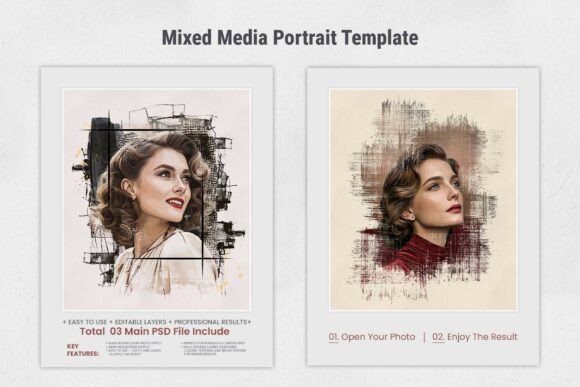
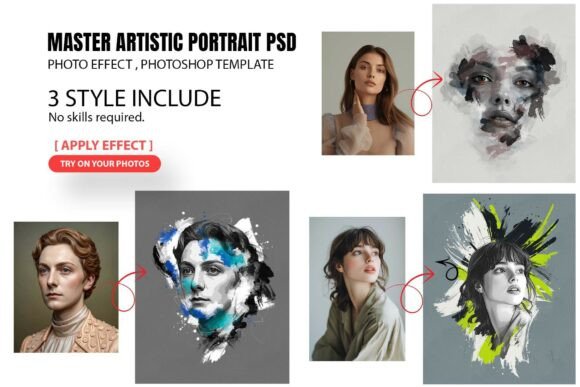
This template is distinct because it utilizes Smart Object integration within Adobe Photoshop rather than simple overlay layers or destructive filters. This architecture allows users to drag and drop images while retaining the ability to non-destructively adjust the underlying photo. Unlike basic texture packs that merely sit on top of an image, this system interacts with the luminosity and color data of the source material to simulate brush strokes and paper grain. However, prospective users must weigh this convenience against the creative control offered by manual digital painting or the speed of AI-generated art alternatives.
Technical Architecture and Workflow Efficiency
The primary value proposition of the Watercolor Portrait Art Template lies in its organized layer structure and resolution standards. When comparing this resource to free online converters or mobile editing applications, the difference in output quality is significant. This template operates at 300 DPI, making it suitable for high-quality printing and large-format displays. Many web-based alternatives compress images to 72 DPI or lower, rendering them useless for professional wedding albums, gallery prints, or commercial posters. For users whose end goal is physical media or high-resolution digital portfolios, this technical specification is a non-negotiable decision factor.
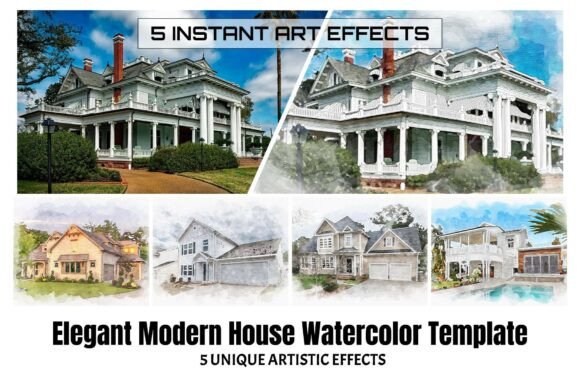
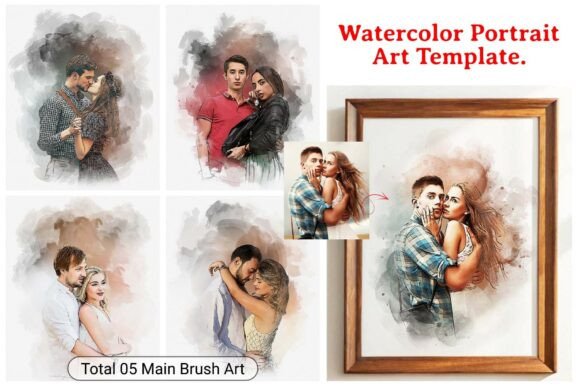
The workflow is streamlined through five unique style variations included in the single PSD file. These styles range from subtle washes to more aggressive sketch-and-paint hybrids. Because the effects are built using adjustment layers, masks, and blending modes rather than flattened raster effects, the user retains customization capabilities. You can adjust colors, modify texture intensity, and refine brush stroke visibility. This level of granularity is often missing in "action" scripts that apply a fixed look with no room for nuance. However, this flexibility comes with a tradeoff: it requires a working knowledge of Adobe Photoshop CS6 or higher. Users unfamiliar with layer masks or Smart Objects may find the initial learning curve steeper than plug-and-play mobile apps.
Comparing Template-Based Art vs. Manual Digital Painting
For artists and designers deciding between purchasing a template and investing time in learning manual digital painting, the choice depends largely on project volume and consistency requirements. Manual digital painting offers unlimited creative freedom; every stroke is intentional, and the result is entirely unique. However, creating a cohesive series of ten wedding portraits manually could take dozens of hours. The Watercolor Portrait Art Template excels in scenarios requiring batch processing or stylistic consistency across multiple images. By using the same Smart Object settings and style variations, a photographer can ensure that an entire gallery shares a unified aesthetic without spending hours repainting each individual portrait.
Conversely, if the goal is to create a singular, fine-art piece where the specific interaction of paint and subject matter is the focal point, a template may feel restrictive. Templates rely on generalized algorithms to determine where paint should appear based on contrast and edges. A human painter makes subjective choices about where to leave white space or where to add detail to guide the viewer’s eye. Therefore, this template is best evaluated as a production tool for enhancing photography, not as a replacement for original illustration. It serves those who want the aesthetic of watercolor without the process of watercolor painting.
Evaluating Alternatives: AI Generators and Filter Plugins
The current market offers various alternatives to PSD templates, most notably AI art generators and dedicated filter plugins. When researching ideas for portrait stylization, it is helpful to understand where this template fits within that spectrum. AI generators can produce stunning watercolor effects, but they often struggle with facial fidelity and specific composition retention. They may hallucinate details or alter the subject's likeness, which is unacceptable for client-based portrait work. The Watercolor Portrait Art Template preserves the original photographic integrity completely because it is an effect applied over the source image, not a regeneration of the source image.
Filter plugins offer another alternative, often integrating directly into editing software. While convenient, many plugins apply global effects that can be difficult to mask selectively. The advantage of the PSD template format is its transparency. Every element is named and grouped, allowing users to turn off specific texture layers, invert masks to protect faces, or duplicate effect layers to intensify specific areas. This modular approach provides a safety net that opaque plugin interfaces rarely offer. If a client requests a softer look or more vibrant colors, the template allows for precise tweaking, whereas some plugins only offer preset sliders with limited range.
Best-Fit Scenarios and Practical Applications
Determining whether this Watercolor Portrait Art Template is the right investment requires assessing your specific use cases. Based on its feature set and technical constraints, this resource is particularly well-suited for three distinct categories of users:
- Wedding and Event Photographers: Professionals who need to deliver artistic edits quickly. The ability to apply a consistent watercolor style to a selection of images ensures brand cohesion and adds value to premium packages without eating into editing time.
- Social Media Content Creators: Users managing personal brands or influencer accounts who require visually distinct thumbnails and posts. The five included styles allow for A/B testing different aesthetics to see what resonates with audiences while maintaining a recognizable visual identity.
- Graphic Designers for Print: Designers creating event flyers, book covers, or merchandise who need high-resolution textures that interact cleanly with typography. The 300 DPI standard and organized layers make it easier to integrate these portraits into larger layout compositions compared to low-res web assets.
In these contexts, the template functions as a force multiplier, enabling high-volume output with professional-grade consistency.
Limitations and Decision Factors
To maintain a balanced evaluation, potential users must also consider the limitations inherent to this type of resource. First, the dependency on Adobe Photoshop is a hard barrier. Those using Affinity Photo, GIMP, or Corel Paint Shop Pro cannot utilize this file natively. Second, while the template handles standard portraits well, it may struggle with low-contrast source images or photos with cluttered backgrounds. Watercolor effects rely on edge detection and tonal variation; flat lighting or busy patterns can result in muddy or indistinct outputs. In such cases, pre-editing the photo to enhance contrast and simplify the background becomes a necessary additional step.
Additionally, users should manage expectations regarding uniqueness. Because this is a commercial template, other designers may use the same five styles. While customization options mitigate this risk, the foundational textures are shared assets. For projects requiring exclusive, trademarkable artwork, commissioning a custom hand-painted piece or creating proprietary brushes remains the superior option. This template is a tool for enhancement and stylization, not a generator of exclusive intellectual property.
Making the Final Selection
Ultimately, the Watercolor Portrait Art Template represents a pragmatic solution for adults seeking to elevate their photographic work with artistic flair. It balances the speed of automation with the quality demands of professional output. When comparing options, prioritize your need for resolution, editability, and workflow speed over the desire for total artistic novelty. If your priority is transforming ordinary photos into polished, print-ready watercolor portraits efficiently, and you possess intermediate Photoshop skills, this template aligns well with those objectives. However, if you seek a zero-learning-curve mobile experience or completely unique fine art, exploring AI tools or traditional digital painting courses may yield better long-term results for your specific goals.