Authentic Texture in Digital Art: Exploring the 11 Line Art Brush Stamp Collection
In the evolving landscape of digital illustration, artists constantly seek ways to bridge the gap between the sterile perfection of pixels and the organic warmth of traditional media. While digital tools offer unparalleled convenience and undo buttons, they often lack the tactile history found in physical environments. This is where specialized assets like the 11 Line Art Brush Stamp - Pattern and Line Art Collection become essential. Unlike standard synthetic brushes generated by algorithms, this collection is rooted in reality, featuring line drawings traced directly from real walls and doors. For digital creators using Procreate, understanding the value and application of these authentic textures can significantly elevate the depth and storytelling capability of their work.
The Significance of Real-World Tracing in Digital Design
To fully appreciate this collection, one must first understand the concept of "digital patina." In traditional art, texture happens naturally; canvas grain, paper tooth, and weathered wood surfaces impart character without conscious effort. In digital art, texture must be intentionally applied. Many beginners rely on generic noise filters or repetitive stock textures that can make artwork feel flat or manufactured.
The primary significance of this specific brush stamp set lies in its origin. Because these line art stamps are traced from actual architectural elements—real walls and doors—they carry the imperfections, irregularities, and unique rhythms of physical decay and craftsmanship. When an artist uses a brush stamp derived from a genuine surface, they are not merely applying a pattern; they are importing a fragment of physical history into a digital canvas. This authenticity resonates with viewers on a subconscious level, making digital illustrations feel more grounded, lived-in, and emotionally engaging.
Versatility Through Resizing and Recoloring
A common misconception about brush stamps is that they are static images with limited utility. However, modern digital assets are designed for flexibility. This collection allows users to resize and recolor every element. This adaptability is crucial for maintaining workflow efficiency while exploring creative variations.
For example, a line art trace of a door frame might serve as a bold foreground element in a large-scale poster when used at 100% scale and high contrast. The same asset, when reduced to 20% opacity and recolored to a subtle sepia tone, could function as a delicate background texture for a vintage-style portrait. This duality transforms a single purchase into a comprehensive design toolkit, suitable for everything from editorial illustration and book cover design to social media graphics and personal sketchbook exploration.
Technical Specifications and Asset Breakdown
Understanding the technical parameters of digital assets is vital for professional results. Resolution and DPI (dots per inch) dictate whether an asset is suitable for web use or high-quality print production. This collection is engineered specifically for high-resolution output, ensuring that lines remain crisp even when printed at large formats.
The package includes two distinct types of assets tailored for different stages of the creative process:
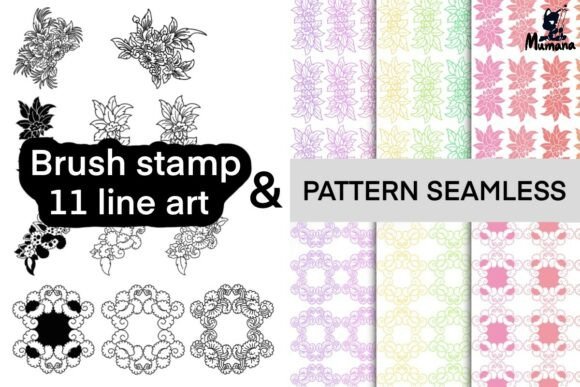
- 11 Line Art Brush Stamps: These are formatted specifically for the Procreate brush engine. They allow for instant placement of complex linework with a single tap, streamlining the composition phase.
- 9 Unique Pattern PNG Files: These high-resolution raster images provide broader coverage and are ideal for layering, masking, and blending modes.
Detailed Resolution Guide
When integrating these patterns into your workflow, it is helpful to note the specific dimensions to plan your canvas size accordingly. All files are provided at 300 DPI, which is the industry standard for professional printing.
- Line Art 1–3: 3420 × 1199 px. These wider, shorter formats are excellent for horizontal dividers, footer elements, or panoramic background textures.
- Line Art 4–6: 4018 × 1118 px. Offering the highest width in the set, these are perfect for expansive wall textures or wrapping around cylindrical objects in 3D-rendered scenes.
- Line Art 7–9: 3000 × 1535 px. With a more balanced aspect ratio, these versatile patterns work well as central focal points or tiled backgrounds.
Practical Applications in Modern Creativity
The utility of traced line art extends far beyond simple decoration. In contemporary design education and professional practice, these tools solve specific visual problems.
Enhancing Narrative and Atmosphere
In illustration, environment tells a story. A pristine white background suggests sterility or abstraction, whereas a textured wall suggests age, mystery, or domesticity. By utilizing brush stamps traced from real architecture, artists can instantly establish a setting. For instance, a children’s book illustrator might use these line art stamps to create the interior of an old cottage, providing immediate context without spending hours drawing individual bricks or wood grains manually.
Mixed Media and Collage Work
Digital collage has seen a resurgence in popularity, blending photography, typography, and illustration. These line art collections serve as the "connective tissue" in mixed media pieces. They can be layered over photographs to add a hand-drawn aesthetic or placed beneath vector typography to soften the harsh edges of digital type. The ability to recolor the stamps ensures they harmonize with any color palette, making them indispensable for brand identity projects where specific color matching is required.
Installation and Workflow Integration
For those new to Procreate or digital asset management, understanding the installation process is key to unlocking the product's value. It is important to note that brush stamps are compatible with Procreate only. Users must ensure their app is updated to the latest version to prevent compatibility issues with newer brush engines.
- Acquisition: After purchase and payment confirmation, you will receive an automated email containing the secure download link.
- Download: Save the files to your iPad’s Files app or a cloud storage service accessible via Procreate.
- Import: Open the Procreate app, navigate to the Brush Library, tap the “+” icon, and select “Import.” Locate your downloaded brush file to add it to your library.
- PNG Integration: For the pattern PNGs, simply insert them via the Actions menu (wrench icon) > Add > Insert a photo.
This streamlined import process allows artists to move from acquisition to creation in minutes, minimizing technical friction and maximizing creative flow.
Licensing, Ethics, and Digital Product Awareness
As the digital marketplace grows, so does the importance of understanding licensing and intellectual property. This collection is a digital product only; no physical item will be shipped. This distinction is crucial for managing expectations regarding delivery times and tangible goods.
From a usage perspective, the license is designed to support working professionals and hobbyists alike. You are permitted to use these brushes for both personal and commercial projects. This means you can sell prints, publish books, or create client deliverables featuring these textures without paying additional royalties. However, ethical digital citizenship requires respecting the creator's labor. Reselling, sharing, or redistributing the brushes themselves is strictly prohibited.
This restriction protects the integrity of the market and ensures that creators can continue to produce high-quality, niche assets. When you purchase this collection, you are not just buying pixels; you are supporting the time-intensive process of sourcing real-world materials, tracing them meticulously, and optimizing them for digital performance.
Building a Broader Understanding of Textural Assets
Ultimately, the 11 Line Art Brush Stamp Collection represents more than just a set of tools; it represents a philosophy of mindful digital creation. It encourages artists to look outward at the physical world for inspiration rather than relying solely on internal generation. By incorporating traces of reality into digital workflows, we preserve the human touch in an increasingly automated medium.
Whether you are a seasoned professional looking to speed up your texturing workflow or a beginner seeking to add professional polish to your sketches, understanding how to leverage authentic, high-resolution assets is a fundamental skill. These brushes offer a tangible connection to the built environment, allowing your digital art to breathe with the same complexity and character as the world around us. Embracing these tools is a step toward creating digital work that feels less like a computation and more like a craft.