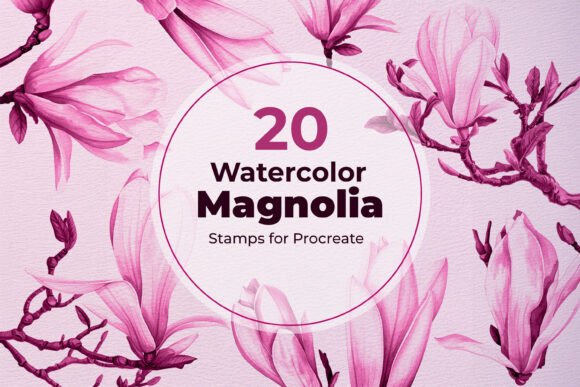
20 Watercolor Magnolia Procreate Stamps: A Practical Guide to Authentic Floral Design
Bringing soft spring elegance to your digital artwork often requires a delicate balance between efficiency and artistic integrity. The 20 Watercolor Magnolia Procreate Stamps set offers a streamlined solution for artists, designers, and creatives who wish to capture the natural transparency and flowing petals of magnolia blossoms without painting each element by hand. These stamps are designed to replicate authentic watercolor textures, allowing you to create romantic floral compositions for invitations, wall art, stationery, and branding in minutes. However, possessing high-quality assets is only half the equation. To truly leverage this set for professional results, it is essential to understand how to integrate these stamps correctly into your workflow while avoiding common pitfalls that can make digital art look flat or artificial.
Understanding the Asset Beyond the Preview
Before incorporating these botanical elements into a client project or personal piece, it is vital to manage expectations regarding what digital stamps actually are. A common misunderstanding among new users is assuming that stamps function exactly like traditional rubber stamps with fixed ink density. In reality, the 20 Watercolor Magnolia Procreate Stamps are high-resolution raster images with varying opacity levels baked into the file. This means they retain the organic bleed and grain of real watercolor paint, but they also carry specific technical limitations.
If you attempt to scale a stamp up significantly beyond its native resolution, you will inevitably encounter pixelation or blurring that destroys the illusion of traditional media. Always check the canvas size and DPI (dots per inch) of your document before placing a stamp. For print projects like wedding invitations or art prints, ensure your canvas is set to at least 300 DPI. Placing a stamp on a low-resolution web canvas and then trying to upscale it for print later is a frequent error that compromises quality. Instead, work at your final output resolution from the start to preserve the crisp edges and subtle texture gradients that define this set.
Avoiding the "Cookie Cutter" Repetition Trap
The most significant risk when using any floral stamp set is creating compositions that feel mechanical. Because the 20 Watercolor Magnolia Procreate Stamps provide consistent shapes, simply placing them side-by-side without modification creates an obvious, repetitive pattern that lacks the chaos of nature. Real magnolias have unique imperfections, varying petal curls, and distinct color shifts that no single stamp can fully replicate on its own.
To correct this, treat each stamp placement as a starting point rather than a finished element. Utilize Procreate’s transform tools to flip, rotate, and slightly warp individual stamps. Even a five-degree rotation or a horizontal flip can drastically alter the visual rhythm of a branch. Furthermore, avoid using the same stamp variant repeatedly in a focal area. Cycle through the different blossom stages included in the set—buds, partial blooms, and full flowers—to mimic natural growth patterns. This variation prevents the viewer’s eye from detecting a looped asset, maintaining the organic feel necessary for romantic and botanical illustrations.
Mastering Color Customization Without Losing Texture
One of the primary advantages of this digital set is the ability to recolor elements to match specific brand palettes or seasonal themes. However, a frequent mistake is applying solid color overlays that obliterate the underlying watercolor texture. If you use a standard blending mode like "Normal" with a solid pink brush over a magnolia stamp, you will lose the paper grain and pigment pooling that gives the stamp its authenticity.
The corrective approach involves using specific blending modes within Procreate. Experiment with "Color," "Hue," or "Multiply" layers above your stamp layer. These modes interact with the existing luminance and texture data rather than covering it up. For example, using a "Color" blend mode allows you to shift a white or pale pink magnolia to a deep coral while retaining the darker painted edges and lighter centers. Always test your coloring method on a duplicate layer first. This non-destructive workflow ensures that if the color adjustment flattens the image, you can revert instantly without losing the original high-resolution asset.
Layering Logic and Depth Creation
Digital watercolor often fails because it lacks physical depth. In traditional painting, wet-on-wet techniques allow colors to merge unpredictably. With stamps, layers remain discrete unless you actively manipulate them. Simply stacking one opaque stamp directly on top of another can result in harsh, unnatural intersections that look like digital cutouts rather than blended paint.
To achieve realistic depth with the 20 Watercolor Magnolia Procreate Stamps, pay close attention to layer order and opacity. Place background foliage and buds on lower layers with slightly reduced opacity to simulate atmospheric perspective. Use the eraser tool with a soft, textured brush to gently fade edges where flowers overlap, mimicking the way wet pigment bleeds into adjacent areas. Additionally, consider adding a separate layer set to "Overlay" or "Soft Light" with subtle noise or paper texture. This unifies the individual stamps, making them appear as though they were painted on the same sheet of paper in a single session. Skipping this unification step is often why digital floral art feels disjointed.
Technical Considerations for Instant Downloads
Since this product is an instant digital download compatible only with Procreate on iPad, verifying file compatibility before purchase saves frustration. Ensure your version of Procreate supports custom stamp brushes, as older versions may handle import functions differently. When importing, organize your stamps immediately into a dedicated brush group. Leaving them scattered in your general library leads to workflow inefficiency and increases the chance of accidentally selecting the wrong tool during detailed work.
Also, be mindful of licensing if you are a freelancer or small business owner. While these stamps are excellent for creating end products like greeting cards or posters, verify whether the license permits use in digital templates for resale. Understanding these boundaries protects your business and ensures ethical usage. For those new to Procreate, spend time practicing with the pressure sensitivity settings of the stamp brush. Unlike standard brushes, stamps usually apply at full opacity regardless of stylus pressure unless configured otherwise. Adjusting the brush studio settings to respond to tilt or pressure can add dynamic variation to your stamping, further bridging the gap between digital convenience and traditional artistry.
Ultimately, the 20 Watercolor Magnolia Procreate Stamps serve as a powerful foundation for botanical illustration, provided they are used with intention. By respecting resolution limits, prioritizing natural variation, utilizing proper blending modes, and understanding layer dynamics, you can transform these digital assets into timeless floral art. The goal is not to hide the fact that you used stamps, but to elevate them so effectively that the final composition resonates with the lightness and beauty of real watercolor magnolias. Approach this tool as a collaborator in your creative process, and it will consistently deliver professional, elegant results for your spring designs and beyond.